


Rhythm Tiles : Piano Game
4.5129.00 Reviews
App Specs
- Version
- 1.5.13
- Updated On
- License
- Free
- Downloads
- 10,000,000+
- Developer
- Boom Studio Limited
- Categories
- Music
- Platform
- Android, iOS
Screenshots


 Analysis by AppCompare
I like rhythm games that make a spare minute feel lively without asking me to learn a complicated control scheme. Rhythm Tiles: Piano Game has that immediate appeal: music leads, tiles give my hands a clear job, and the challenge comes from keeping my timing steady as a track moves along. It is a music game from Boom Studio Limited, and the simple premise makes it easy to understand before deciding whether this style of play suits you.
A quick session on a shared screen
This is the kind of game I can imagine picking up while waiting for dinner or passing a phone between people at home. One person can try a song, then hand the device over for someone else to see how they fare. The basic interaction is easy to explain, so nobody needs a long tutorial from another player just to get started.
Shared play works best as a casual turn-taking activity rather than a group game. The appeal is comparing how a song feels to each person, not assuming that everyone is playing together in real time. I would also agree on whose turn it is before starting: rhythm games reward concentration, and an unexpected handoff mid-song is more distracting than fun.
What the setup means for a household
Because the game is played on a phone or tablet, the device itself shapes the experience. A larger screen may make approaching tiles easier to follow, while a smaller phone is more convenient for a quick attempt on the sofa or during a break. Either way, I would keep the screen comfortably in reach and avoid playing while walking or doing something that needs attention.
On a device shared by several people, it is worth treating each person’s play as part of the same device environment rather than assuming everyone has a separate space. Before handing it to a child or another household member, I would check the device’s general purchase and account settings. The game is free to start, but in-app purchases are available, so it is sensible to make sure the person using the device understands that paid items can exist.
Making turns fair and sessions manageable
A useful way to share the game is to agree on a simple routine: choose who picks the next song, give each person a turn, and avoid changing the device or settings while someone is playing. This keeps the focus on the music and prevents a casual session from turning into a dispute about who got the easier attempt. If people have different levels of rhythm-game experience, let each player choose a challenge that feels comfortable instead of treating every score as a direct contest.
I would also use short sessions when the game is being passed around. That makes it easier to fit a round into family downtime and helps younger players stop when they have had enough, rather than chasing one more attempt indefinitely. The game’s quick-tap premise is a good match for brief play, but it is not a substitute for a shared music activity where everyone can participate at once.
Worth Reading Before You Choose

EA SPORTS FC Mobile 26 Is a Bigger Football Game, but It Takes Time

Flipboard Shows What News Apps Must Do Beyond the Feed

Switching to Android Auto Means Rethinking Your Driving Routine

Google Calendar Makes a Crowded Week Easier to Manage

Ludo King Makes the Most of the Minutes Between Plans

Baby Panda World Brings Quick Play to Modern Phones, but Its Game Library Feels Busy
Age, spending, and expectations
The game is rated Everyone, which makes it broadly approachable from an age-rating perspective. That rating is useful context, but it does not replace a parent’s judgment about screen time, spending, or whether a fast-tapping game is a good fit for a particular child. I would introduce it as a casual music challenge, not as a piano lesson: tapping tiles to a track can exercise timing and attention, but it does not teach piano technique in the way a structured instrument-learning app would.
Its free price makes it easy to try, while optional purchases mean households may want to keep purchase approval in mind. I would not assume that a child will understand the difference between playing for free and choosing a paid item without a quick explanation. That small conversation can prevent an awkward surprise on a shared device and keeps the game’s role clear: entertainment first.
How it fits alongside other music games
Compared with music games built around holding a controller, following a long lesson, or competing in a room together, this one is a direct touchscreen test of timing. That makes it convenient for a solo burst and approachable for someone who has never played a rhythm game. The trade-off is that people who want a social mode, instrument instruction, or a carefully curated listening experience may be happier with a different kind of music app.
I would choose it when the goal is to react to a beat and improve through repetition. I would choose a learning-focused piano app for notation, technique, and guided practice, or a music-listening app when I simply want songs in the background. Knowing that distinction helps set fair expectations: the tiles are the point, and the game is most enjoyable when you want an active challenge rather than passive listening.
First Impressions and Interface
When you first open Rhythm Tiles: Piano Game, you're greeted with a sleek and straightforward interface. The design is minimalistic, which I appreciate because it keeps the focus on the music and gameplay. There's no clutter, just a clean menu with all your options laid out nicely. You can jump right into the action or browse through the settings to customize your experience.
Gameplay Mechanics
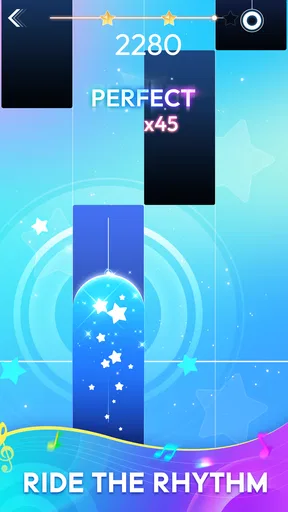
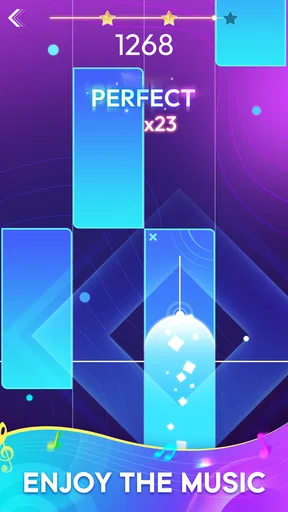
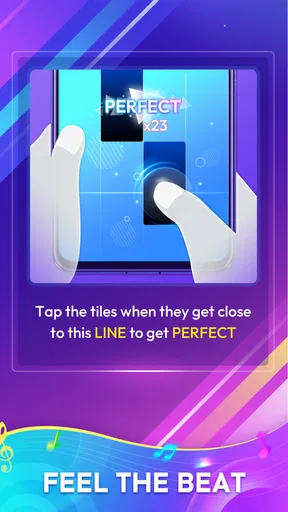
The core of the game is all about tapping tiles in time with the music. It's simple in concept but incredibly challenging to master. As the music plays, tiles scroll down your screen, and your job is to tap them at just the right moment. What I love about it is that it's easy to pick up but offers a deep level of skill development. The more you play, the better you get at anticipating the rhythm and timing your taps.
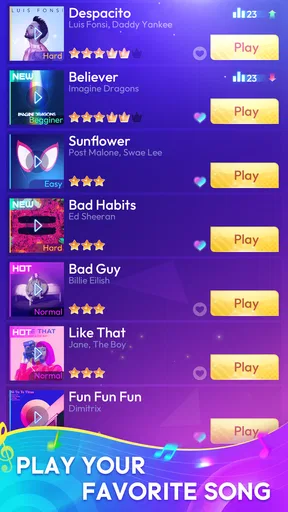
Each song is a journey, starting off slow and building up to a frantic pace. The game does a fantastic job of syncing the tiles with the beat, making each successful tap feel satisfying. Plus, there's a wide variety of songs to choose from, catering to all sorts of musical tastes. Whether you’re into pop, classical, or even electronic, there’s something here for you.
Features and Customization
One of the standout features for me is the customization options. You can adjust the speed of the tiles, which is perfect if you’re looking for an extra challenge or just want to enjoy the music at a leisurely pace. There are also different themes to unlock, adding a bit of personal flair to your game.
Another cool feature is the ability to compete on leaderboards. It adds a layer of competitiveness and gives you the drive to improve your scores. Seeing your name climb the ranks is a thrill, and it’s a great way to connect with other players.
Audio and Visual Experience
The audio quality in Rhythm Tiles: Piano Game is top-notch. Each track is crisp and clear, making it easy to get lost in the music. The visual effects complement the audio perfectly, with vibrant colors and smooth animations that keep the game visually engaging without being distracting.
I found that playing with headphones on really enhances the experience. It allows you to fully immerse yourself in the rhythm and focus on the beat. If you're all about that auditory experience, this game won’t disappoint.
My Personal Journey
As someone who loves rhythm games, I found myself quickly hooked on Rhythm Tiles: Piano Game. The learning curve is just right, and it’s incredibly satisfying to see improvement over time. I started off fumbling through the easier tracks, but soon enough, I was tackling the more complex ones with confidence.
The game has a way of keeping you motivated, with its combination of challenging gameplay and rewarding progression. Each new high score felt like a personal victory, and I couldn’t help but keep coming back for more.
Final Thoughts
Overall, Rhythm Tiles: Piano Game is a fantastic app for anyone who loves music and games. It’s a perfect blend of fun and challenge, with enough variety to keep things fresh. Whether you’re a rhythm game veteran or a newcomer looking for something new, this app is well worth a try.
So, if you’re ready to tap your way through some amazing tunes and test your skills, give it a download. Just be warned—it’s addictive!
Who will enjoy it, and who may want something else
The strongest fit is someone who likes short, responsive challenges and does not mind repeating a section to improve timing. It can also work for a household member who enjoys music but has little patience for menus, elaborate rules, or a long setup. With a 4.8 average from around 10,000 ratings and over 10 million installs, it has clearly found a sizable audience, though popularity alone cannot tell you whether its particular tap-to-the-beat style will click for you.
I would be more cautious about recommending it to someone who wants a quiet listening session, precise music theory practice, or a shared activity where every person has an active role at the same time. Its one-finger simplicity is a strength when you want an immediate challenge, but it also narrows the experience: the fun depends on reacting to the tiles rather than exploring an instrument or building a song.
Small habits that make the tapping feel better
For a first session, I would choose a comfortable tile speed rather than immediately turning the game into a test of reflexes. Once the beat feels familiar, adjusting the pace is a practical way to make a repeat attempt more useful: it can help separate learning the rhythm from trying to handle a faster visual flow. If a track feels difficult, focus on steady contact and a relaxed hand instead of hitting the screen harder; force does not improve timing and can make a longer session tiring.
Headphones can help when the surrounding room is noisy, but they are not automatically the best choice in a shared home. If someone needs your attention, or you are keeping an eye on children, leave enough awareness of the room. The game is most satisfying when the beat is clear, yet the household context matters more than total immersion.
What to know before installing
It is free to download, with optional in-app purchases ranging from $0.49 to $75.88 per item. I would treat that range as a reason to check purchase controls on a shared device before letting someone else explore freely, not as a reason to assume that payment is required to try the basic idea. The game is rated Everyone, and it runs on Android 6.0 or later; its current version is 1.5.13. It was released on December 19, 2023, and has 124 reviews, details that can help you identify the specific app if several similarly named tile games appear in a search.
One practical question is whether it is suitable for a quick break: yes, the straightforward tapping makes it easy to start a brief session, though the urge to retry a song can stretch that break. Another is whether it is a good substitute for piano lessons: no, I would not use it for that purpose. It is a rhythm game, not a course in posture, keys, notation, or playing an instrument. For someone deciding between it and a more traditional music game, I would pick this when touchscreen timing is the attraction, and choose a lesson-based option when learning an actual skill is the priority.
A household verdict based on fit
For a shared phone or tablet, I see this as an easygoing option when people want to take turns, compare attempts, or fill a few minutes with music-focused play. Boom Studio Limited’s game keeps its central idea accessible, and the Everyone age rating makes it easier to consider for mixed-age households, while purchase awareness and reasonable turn-taking still matter. The free entry point lowers the commitment, but the optional paid items make basic device boundaries worthwhile.
My recommendation is conditional rather than universal: try it if you want an active, beat-led diversion that is simple to pass along and satisfying to improve at. Skip it if your household is looking for a cooperative music game, a piano tutor, or a hands-off soundtrack. That distinction is what makes the choice clearer than the broad label of “music game”: here, the pleasure comes from listening closely, watching the tiles, and getting your timing just a little better each time.
Pros
- Intuitive gameplay for all ages.
- Variety of songs to choose from.
- Offline mode available.
- Responsive touch controls.
- Regular updates with new content.
Cons
- Ads can be intrusive.
- Limited free song selection.
- In-app purchases can be pricey.
- Occasional lag on older devices.
- Requires frequent updates for new songs.
FAQs for Rhythm Tiles : Piano Game
What is Rhythm Tiles: Piano Game and how does it work?
Rhythm Tiles: Piano Game is a music-based game that challenges players to tap on tiles in sync with the rhythm of popular songs. As the music plays, tiles descend on the screen, and players must tap them accurately to score points. The game offers various difficulty levels, allowing players to improve their timing and reflexes.
Is Rhythm Tiles: Piano Game suitable for all ages?
Yes, Rhythm Tiles: Piano Game is designed to be accessible for players of all ages. Its intuitive interface and adjustable difficulty levels make it a fun and engaging experience for both young children and adults. However, younger children might need supervision to ensure they understand the gameplay mechanics.
Does Rhythm Tiles: Piano Game require an internet connection to play?
Rhythm Tiles: Piano Game can be played offline, making it convenient for users who do not have constant access to the internet. However, an internet connection might be necessary for downloading additional songs and updates, as well as accessing online leaderboards and competitions.
Are there any in-app purchases in Rhythm Tiles: Piano Game?
Yes, Rhythm Tiles: Piano Game offers in-app purchases. These can include additional songs, game modes, or cosmetic enhancements. While the game is free to download and play, these optional purchases can enhance the gaming experience but are not necessary to enjoy the core gameplay.
What devices are compatible with Rhythm Tiles: Piano Game?
Rhythm Tiles: Piano Game is available for both Android and iOS devices. It requires a device running at least Android 5.0 or iOS 10.0. It's recommended to have a device with good processing power and a responsive touchscreen to ensure smooth gameplay and optimal performance.


